A successful product demo helps attendees answer one question: does this solution meet my needs? Showing an interface is only part of the process. You also need to explain a use case, listen to questions and give everyone a relevant next step.
Comparing webinar platforms for product demos
Sparkup suits group demos that combine a branded experience with audience interaction. Demio focuses on engagement and marketing follow-up, Livestorm on managing the webinar journey and its integrations, Zoom Webinars on presentations to large audiences, and eWebinar on prerecorded demos available on a recurring basis.
How do you choose a webinar platform for your product demos?
How easy it is to run the demo
During a demo, presenters need to focus on their product and explanations. They often need to share their screen, show a video, switch back to the camera or answer a question.
To compare platforms, test a sequence that reflects your actual demo. Check how the platform lets you switch between different types of content and whether a second person can manage what appears on screen or moderate questions while you present.
Also check the attendee experience: menus, text and on-screen actions need to remain easy to see and follow. This is particularly important when presenting an interface with a lot of information.
Interactions that help you understand attendees’ needs
People do not all attend your product demo for the same reasons. Some are discovering your solution, while others want to solve a specific problem or check whether a feature fits their use case. Interactions help you understand these expectations and adapt your presentation.
For example, a poll at the beginning of the demo can help you decide which use case to show first. A question during the presentation can reveal an objection or a misunderstanding. Inviting an attendee to speak lets you explore their needs in more detail.
Check the range of interaction tools available: poll question types, written questions, chat and opportunities to speak. Are you limited to multiple-choice polls, or can you use other formats such as word clouds? Above all, check whether the presenter can easily view the responses and use them during the demo.
Customizing the attendee journey
The first contact with your brand happens before the live session, through the invitation and registration page. It continues through reminder emails, the webinar room and messages sent after the session.
Check what you can customize at each stage: logos, colors, visuals, text, video branding and layouts. The goal is a consistent brand experience in which attendees can clearly identify your company and the topic being presented.
During the demo, customization should also support the presentation: displaying a speaker’s name, highlighting key information or giving the screen share enough space.
The data available after the demo
Not every platform provides the same level of detail about attendees. Some metrics help you evaluate the session as a whole: registration numbers, attendance rates and average viewing time. This is aggregate data, which is useful for comparing demos and improving their format.
Individual data allows for more specific follow-up. Can you see how long someone attended, their poll responses, the questions they asked or the resources they viewed? This information can help a sales representative pick up the conversation based on the needs that person expressed.
Check which data you can actually access and export. Keep one important distinction in mind: someone who stays until the end does not necessarily intend to buy. The content of their answers and questions provides more context about their interest.
Integrations with your CRM and marketing tools
Having data is one thing; being able to use it in your follow-up tools is another. If your team works in a CRM, look at how webinar information can be sent to it.
Start by defining what you need: creating a contact after registration, recording their attendance, saving their responses or triggering a follow-up. Then check whether the platform offers a native integration, a manual export or an API that requires technical setup.
Do not stop at seeing your CRM’s logo in an integrations list. Ask what information is transferred and how it appears in the contact record. An integration that only sends registrants does not support the same follow-up as one that also transfers their responses and questions.
Choosing between live and automated demos
A live demo lets you adapt your explanations to the audience’s reactions, answer questions and show an unplanned use case. It is particularly useful when attendees’ needs vary or the product requires explanation.
An automated demo uses a prerecorded presentation, delivered at scheduled times or available on demand. It can be useful for regularly presenting the same workflow without requiring a presenter for every session.
Choose a platform that fits your intended format. If you opt for automation, also check how attendees can ask questions, who responds and how quickly they can expect an answer.
The cost of your demo program
The starting price is not enough to compare platforms. Costs may depend on the number of attendees, organizers, sessions or features used. Customization, automation and certain integrations may require a higher-tier plan.
Use a realistic scenario for your comparison: how many demos will you run each month, for how many attendees and with how many presenters? Include the features that are essential to your workflow.
This lets you compare the budget your program actually needs, rather than entry-level prices that may cover different requirements.
1. Sparkup: combining product demos, brand experience and audience interaction
Pricing: from €79 per month, billed annually, for unlimited webinars with 100 attendees and up to 4 simultaneous speakers.
Best for: marketing and sales teams that want to easily create engaging group demos with a professional, customized look and useful data for follow-up and conversion.
Why choose Sparkup?
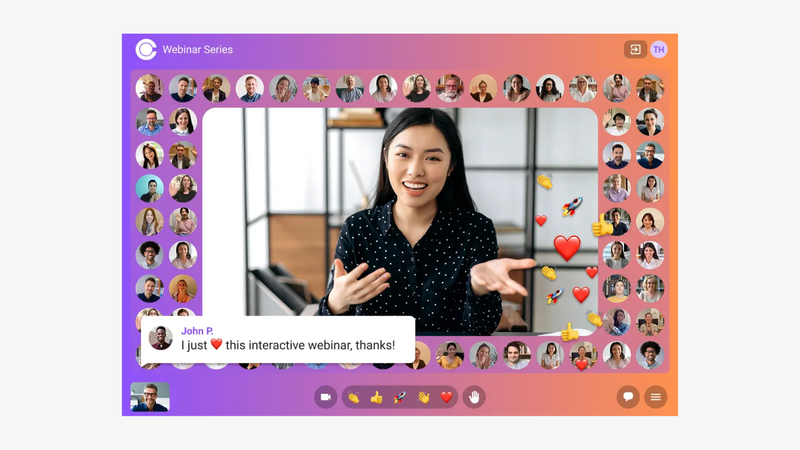
Sparkup lets you present a product professionally in a customized live session, with real-time interactions built directly into the video stream for a more dynamic and engaging experience.
Polls with five question types, emoji reactions, word clouds, quizzes and Q&A help you understand your audience’s expectations. Meanwhile, a video mosaic lets you see all the remote attendees, creating a more welcoming demo experience that feels closer to an in-person presentation.
At any time, attendees can raise their hand to ask a question aloud rather than typing it in the chat.
Sparkup’s approach is to provide a browser-based studio that makes production easier and lets you invite as many colleagues as you need to manage the webinar backstage, from displaying content to activating and moderating interactions.
After the demo, individual and aggregate data help you identify the topics that prompted reactions and prepare follow-up based on what each person expressed.
Key features:
- Online studio to switch between screen sharing, speakers and content.
- Layouts and banners for a broadcast-style presentation.
- Customized registration page.
- Custom registration form fields.
- Customized automated reminder and confirmation emails.
- Audience video mosaic.
- Ability to invite attendees to speak.
- Polls, quizzes and word clouds integrated into the video.
- Production and moderation with colleagues invited backstage.
- Real-time translated captions.
- Individual and aggregate engagement data.
- API for CRM integration.
What to consider: connecting Sparkup to your CRM through the API may require some technical setup. If your priority is a ready-to-use native integration, compare the work involved with the integrations available on other platforms.
2. Demio: preparing the next step after the demo
Pricing: the Starter plan begins at $45 per month, billed annually, for 50 attendees and one host. Automated formats and some customization options require higher-tier plans.
Best for: marketing teams that want to connect their group demos with interactions, shared resources and follow-up.
Why choose Demio?
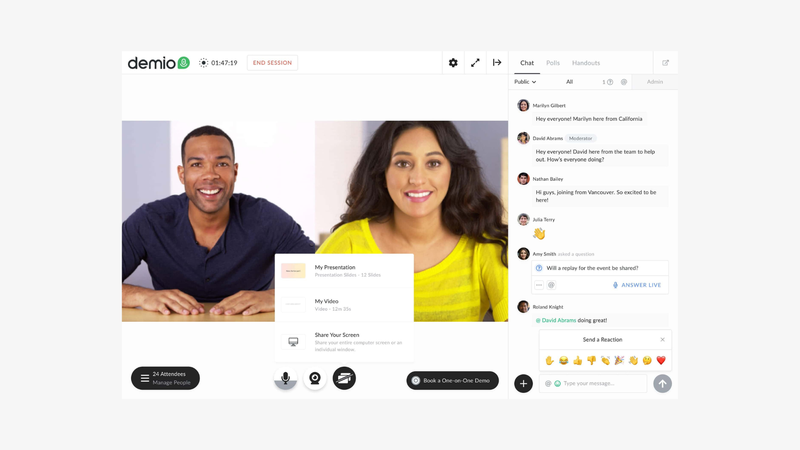
Demio suits a demo built around a specific need and a next step: exploring a use case, downloading a resource or booking a meeting.
Documents and calls to action help support this progression during the session.
Reports then show how attendees interacted with calls to action, helping the marketing team prepare its follow-up. This approach is useful if you want to compare different demo scenarios and see which topics interest your audience.
However, results need to be interpreted carefully: participation or a click provides information, but it does not replace a sales conversation to qualify the need expressed.
Key features:
- Live sessions with registration pages and related communications.
- Polls, Q&A, chat and shareable documents.
- Calls to action displayed during the presentation.
- Reports on responses, downloads and clicks.
- Automated and on-demand webinars, depending on the plan.
What to consider: compare the plan that matches your attendee capacity and automation needs. When following up, avoid automatically treating every interaction as a buying signal: questions and explicit requests remain essential.
3. Livestorm: managing the webinar journey and its integrations
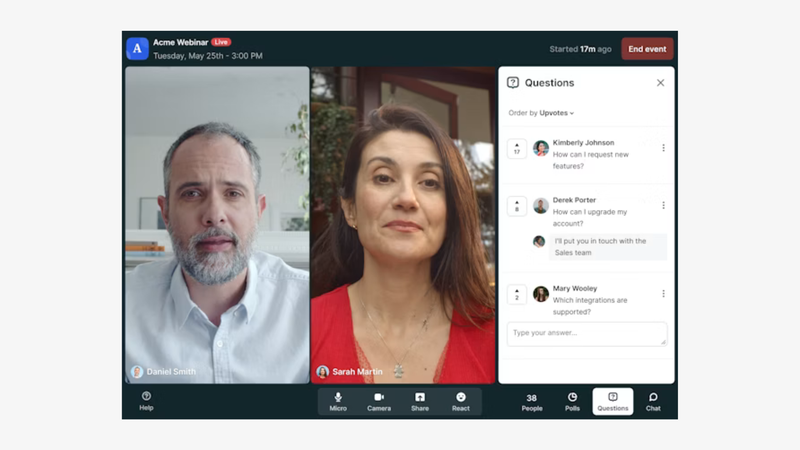
Pricing: Pro is priced at €2.50 per attendee credit, with a minimum commitment of 400 annual credits, or €1,000 per year. The same person attending several events uses multiple credits.
Best for: teams that want to manage demos in a general-purpose platform and connect them to their marketing tools.
Why choose Livestorm?
Livestorm lets you organize the standard group demo journey, from registration to replay, in a browser-based environment.
Its native integrations can simplify the process of sending data to tools used by marketing and sales teams.
ISO 27001 certification also provides a concrete point to consider in a security assessment.
Its value largely depends on how well it fits your organization’s security needs and existing integrations, since browser access, interactions and end-to-end webinar management are also available elsewhere. Compare the features you actually need, their availability in your chosen plan and the annual cost of your demo program.
Key features:
- Browser access with no installation required.
- Customized registration pages.
- Custom registration form fields.
- Automated reminder and confirmation emails.
- Content sharing.
- Polls, chat and Q&A.
- Attendance and interaction analytics.
- Marketing and CRM integrations, including HubSpot; some integrations are reserved for Enterprise.
- SAML SSO options.
- Choice of video hosting region.
What to consider: end-to-end webinar management and access without installation are not exclusive to Livestorm and are also available on platforms with lower pricing. Compare its annual credit model with other pricing approaches using your actual volumes. Some options and integrations require an additional plan or add-on.
4. Zoom Webinars: presenting a launch or demo to a large audience
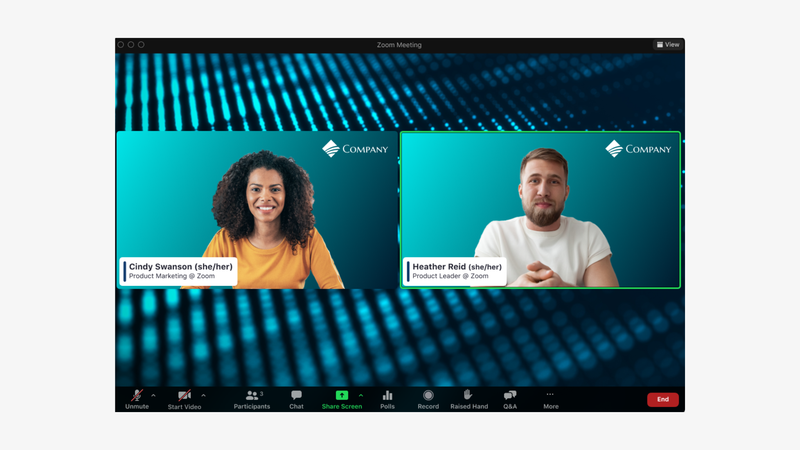
Pricing: Zoom Webinars starts at US$89 per month when billed monthly.
Best for: companies organizing large-scale demos, launches or product presentations with multiple speakers.
Why choose Zoom Webinars?
Zoom Webinars suits product presentations organized as major events, with designated speakers and managed audience participation.
It lets you structure the demo, assign roles and address questions during planned segments.
Choosing Zoom Webinars makes sense when the priority is a carefully prepared group event rather than a more straightforward product demo that is quick to set up. The quality of the experience then depends on the agenda, settings and preparation of the people running the session together.
Key features:
- Management of hosts, panelists and attendees.
- Screen sharing, polls and Q&A.
- Recording and event reports.
- Attendee capacity options based on the plan.
- Advanced studio and production features in higher-tier plans.
What to consider: the broad feature set comes with numerous settings. The platform retains the conventions of video conferencing and requires careful configuration of roles, access permissions and speaking permissions to deliver a controlled, smooth webinar. Also test browser access: available capabilities vary by configuration and device.
5. eWebinar: offering a standard demo without running more live sessions
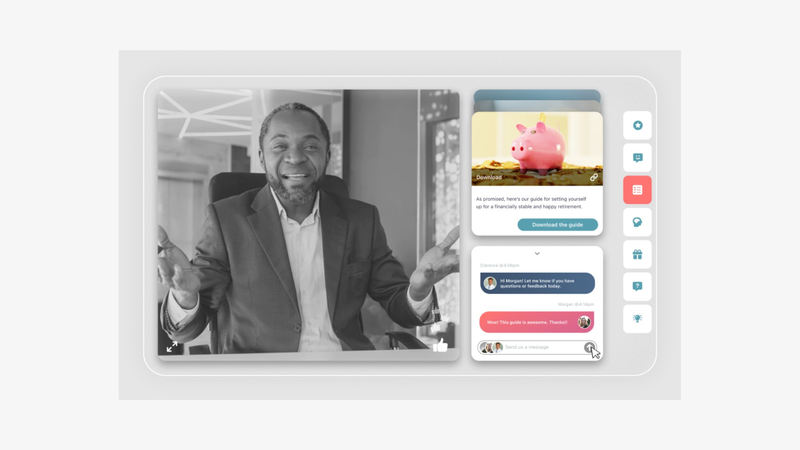
Pricing: from US$84 per month, billed annually, for one active webinar and 1,000 registrants per month, with unlimited recurring sessions.
Best for: teams that repeat the same presentation and want to make it available across many time slots or on demand.
Why choose eWebinar?
eWebinar is useful when your demo follows a consistent script that you want to make available without requiring a presenter for every session.
The prerecorded video can include polls, resources and a chat to collect questions. The team can keep the presentation available while organizing responses to individual requests.
This approach is particularly suitable for an initial product overview before a more focused conversation. Be clear about the format and plan what comes next: a later response, a meeting or a personalized demo when the prospect’s situation goes beyond the scenario covered in the video.
Key features:
- Automated demos based on prerecorded video.
- Recurring sessions and on-demand access.
- Polls, resources and calls to action.
- Chat with live or asynchronous responses.
- Reports and integrations with follow-up tools.
What to consider: a prerecorded demo needs updating as the product evolves. It does not let a presenter spontaneously adapt their explanation. Provide an easy transition to a conversation with a person for specific needs.
Which platform should you choose for your demo format?
For an interactive demo with multiple prospects
Sparkup is the most relevant choice when interaction, the attendee experience and audience participation are central to the format.
For a demo that is part of a marketing campaign
Compare Demio and Livestorm based on the data you need for follow-up. The right integration transfers useful responses, not just a list of registrants.
For a demo to a large audience
Consider Zoom Webinars and Sparkup based on your interaction plan, production expectations and ease-of-use requirements. A test with several speakers will be more useful than comparing feature lists.
For an initial product overview available on demand, eWebinar can reduce repetitive presentations. Keep a personalized meeting available for questions that require an understanding of the prospect’s situation.
A simple test before choosing
Use the same fifteen-minute scenario on your shortlisted platforms: a question about attendees’ needs, a use case, a practical walkthrough using screen sharing and a next step. Ask a colleague to raise an unexpected objection.
Then compare two things: how easily the presenter adapted their explanation and the information available to prepare follow-up. This test will show whether the tool genuinely helps prospects evaluate the product.
FAQ
What is the best webinar platform for product demos?
The best platform depends on your demo format. Sparkup suits interactive live demos, with a video mosaic to see attendees, interactions integrated into the video stream and detailed data to prepare follow-up. Compare Demio and Livestorm if marketing integrations are your priority. Zoom Webinars suits presentations to large audiences, while eWebinar meets the need for prerecorded demos available on a recurring basis.
What is the difference between a demo webinar and a one-to-one demo?
A webinar presents a shared use case to several people and addresses common questions. A one-to-one demo explores a specific situation in more depth. The two formats can complement each other within the same sales journey.
Can you qualify prospects using webinar data?
Yes, by looking at what they express: needs, challenges, timelines or requests for contact. Clicks and attendance duration provide context, but do not prove purchase intent. Define your follow-up criteria with your sales team.
Is an automated demo suitable for a complex product?
It can present a clearly defined use case. If the product’s value depends heavily on the customer’s configuration, plan a tailored conversation afterward. The video should help prepare that conversation rather than attempt to cover every scenario.
How many features should you show during a demo?
Focus on the features that solve the problem you set out to address. A complete, easy-to-follow workflow helps people evaluate the product more than a rapid succession of features. Save other capabilities for questions or a dedicated session.