A SaaS company can use webinars to attract prospects, showcase its product, or train customers. The right platform depends on what you need to do: produce an interactive live session, send data to your CRM, or automate a recurring demo. Here are six solutions to compare based on those priorities.
Which webinar platform should you choose for your SaaS company?
Sparkup is worth considering for its ease of use and its tools for creating more interactive, branded experiences; Livestorm for marketing integrations and security; Demio for conversion-focused webinars; Zoom for large audiences; ON24 for a broader marketing program; and eWebinar for automating recurring and on-demand presentations.
How to choose a webinar platform for a SaaS company
Start with the experience you want to deliver: registration, participation, questions, sales follow-up, and replay. A platform that works for your marketing team may be less suited to your Customer Success team's needs.
Registration and reminders
For a lead generation webinar, the registration form should collect enough information to support follow-up without turning into a sales qualification questionnaire.
Ask yourself which data you will actually use. An attendee's job title can help you tailor your examples. A question about their main challenge can inform the content. Whatever you add, every field should serve a clear purpose.
During your trial, complete the registration process on both a computer and a phone. Check the confirmation, reminder, calendar invitation, and session access. This experience matters just as much as the page's appearance.
Branding and customization
Your webinar should reflect your brand, from registration to replay. Check whether you can customize the logo, colors, registration page, emails, and live visuals. The goal is to deliver an experience that feels consistent with your website and other communications.
Live interaction and engagement
People join a SaaS webinar with different expectations and levels of knowledge. Some are discovering your product; others are trying to solve a specific problem. Polls, chat, and Q&A help surface those needs during the presentation so you can address them directly.
An opening poll can help you decide which use case to cover first or gauge your attendees' experience. A question during a demo might reveal a barrier to adoption: a missing integration, a usability concern, or uncertainty about how the product works.
When choosing a platform, assess how easily you can launch an interaction, read responses, share results, and respond to the audience. Also check which data you can access afterward. An overall result and an answer linked to an individual contact serve very different follow-up purposes.
Ease of use for the host
Sharing a screen, displaying a presentation, playing a video, launching a poll, or switching speakers should be straightforward during the live session. Check that the platform makes it easy to move between content and lets a colleague join as a producer or moderator to manage things backstage while you present.
Easy access for attendees
Joining your webinar should be simple. Check whether attendees need to download an app, create an account, or can join directly from their browser. Test the mobile experience too: from the reminder email to joining the webinar, every step should be clear and work across devices.
Data and analytics
How many people registered, attended, and stayed until the end? Which questions or interactions generated the most interest? This data helps you measure your webinars' performance and improve future sessions.
Above all, check whether the data is available in aggregate or for each attendee. A poll participation rate helps assess overall engagement. Knowing who answered what helps you understand each contact's needs and personalize follow-up. Both levels are useful, but they serve different purposes.
Integrations with your tools
Your webinar platform should fit the way your team works. Check the available connections to your CRM and marketing tools, such as HubSpot or Salesforce, and which information they transfer: registrations, attendance, or poll responses. The goal is to make follow-up and sales outreach easier without relying on repeated manual exports.
Replays and content repurposing
A replay, an automated webinar, and a video clip serve three different needs. A replay lets people watch the session again. An automated webinar builds an experience around a recording. A clip helps you share an idea or a short demonstration.
Before choosing, decide what you want to create after each live session: a resource for people who missed it, an always-available demo, or several pieces of content for LinkedIn and YouTube. Check the available exports and which steps will require another tool.
The total cost of your webinar program
Compare plans against your actual needs: number of sessions, concurrent audience size, hosts, integrations, and required add-ons. Include the time spent preparing sessions and processing data.
Ask each vendor to quote for the same scenario, such as two marketing webinars per month and one customer training session per week. This comparison will be more useful than looking at two starting prices that cover different things.
The 6 best webinar platforms for SaaS companies
Registration, broadcasting, interaction, and replay features are available across several platforms in this selection. The differences lie in how they work: ease of production, customization, depth of data, security, audience capacity, and automation.
The prices below were reviewed in October 2026 and are shown in each vendor's listed currency. Monthly rates billed annually require annual payment. Check capacity, add-ons, and any applicable taxes for your configuration: these plans do not all cover the same scope.
1. Sparkup: interactive, branded webinars that are easy to run
Price: from €79/month for 100 attendees on the Webinar plan, billed annually. Pricing increases with your chosen attendee capacity.
Best for: Marketing, sales, internal communications, and Customer Success teams that want to run participatory, branded webinars easily while gathering useful insights into attendee engagement.
Why choose Sparkup?
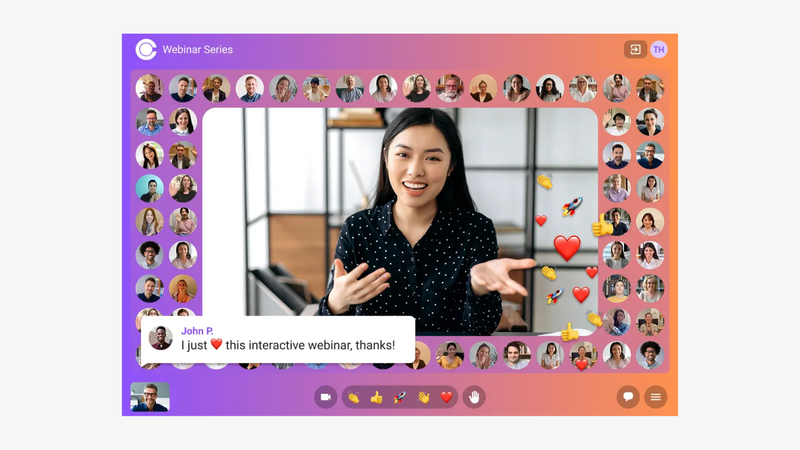
Sparkup provides a browser-based live studio for producing modern, branded, interactive webinars without technical expertise. You can invite as many colleagues as you need backstage to help produce and moderate the session.
Polls, quizzes, word clouds, and banners are built directly into the video, giving the webinar the feel of a TV show or a social media live stream.
The audience video mosaic makes attendees visible and creates a shared viewing experience. Participants can also be invited to speak, as if everyone were in the same room.
Customization covers the entire journey, from registration to the live session, for a consistent brand experience. Translated captions also make the content more accessible to international audiences.
After the session, aggregate and individual engagement data, including watch time, poll responses, and questions, help you understand who engaged, how, and with which topics, so you can improve future webinars and personalize follow-up.
Key features:
- Interactive audience video mosaic
- Interactions built into the stream: polls, quizzes, word clouds, chat, Q&A, and reactions
- Ability to invite attendees to speak
- Browser-based production studio for managing speakers, screen sharing, presentations, videos, and layouts
- Branded registration pages
- Custom registration form fields
- Automated reminder and confirmation emails
- Unlimited co-producers and moderators
- Aggregate and individual engagement data
- CRM connectivity through an API
- Automatic session recording
- Real-time translated captions
What to consider: Connecting Sparkup to your CRM through its API requires technical setup. If you want a native integration you can activate immediately, factor this configuration work into your comparison.
2. Livestorm: a general-purpose platform with documented security practices
Price: pricing is based on an annual pack of attendee credits. €2.50 per credit for 400 credits, or €1,000 for the entry-level pack. One person attending two separate sessions uses two credits; people who register but do not attend are not counted.
Best for: SaaS teams that want to centralize their webinars while also meeting their organization's security requirements.
Standout strength: Coverage of the webinar journey, combined with ISO 27001 certification and options for access control and video hosting.
Why choose Livestorm?
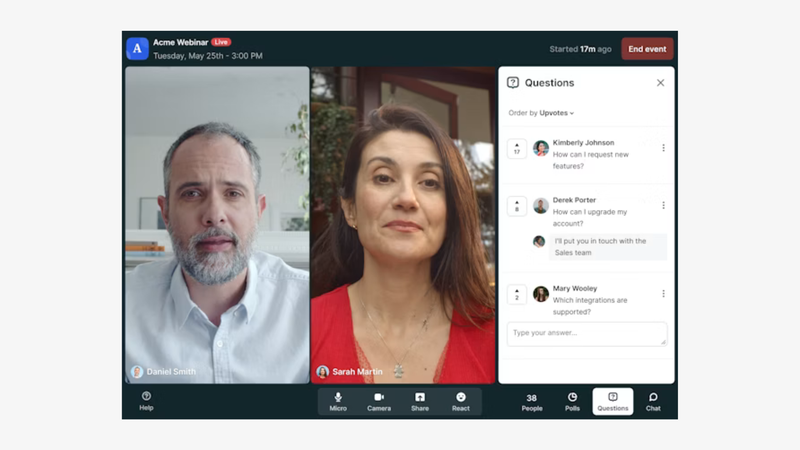
Livestorm brings the main stages of a webinar together in a browser-based platform: registration, emails, broadcasting, interactions, and replay.
This approach suits SaaS teams that want to manage everything in one place while meeting their IT department's requirements.
Its ISO 27001 certification and security options are worth examining for teams that prioritize security.
Livestorm's appeal also depends on its integrations with CRMs such as Salesforce and HubSpot.
Key features:
- Branded registration pages
- Custom registration form fields
- Automated reminder and confirmation emails
- Content sharing
- Browser access with no installation required
- Polls, chat, and Q&A
- Attendance and interaction analytics
- Marketing and CRM integrations, including HubSpot; some connectors are reserved for Enterprise
- SAML SSO options
- Choice of video hosting region
What to consider: Several competitors also provide an all-in-one experience for managing webinars from start to finish, with more affordable plans. Livestorm charges through annual attendee credits: the same person attending several webinars uses several credits. Assess the cost across your entire program, including options and integrations that require a higher-tier plan or an add-on.
3. Demio: marketing webinars focused on action and conversion
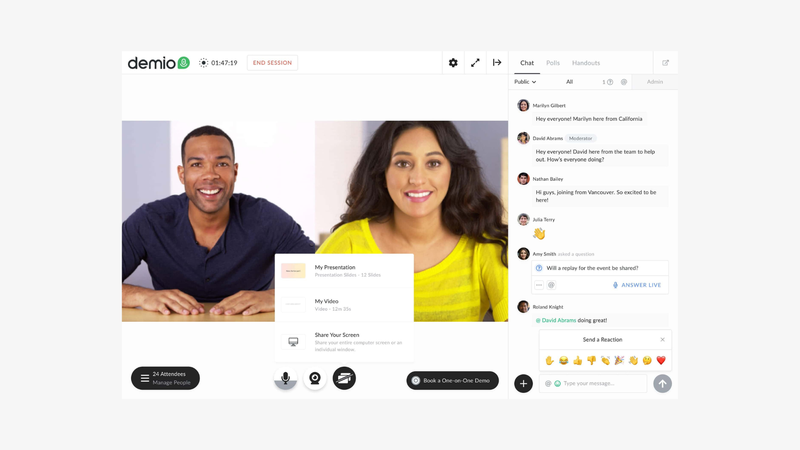
Price: Starter begins at US$45/month, billed annually, for one host and a room of 50 attendees. Pricing increases with capacity and the number of hosts.
Best for: SaaS marketing teams running conversion-focused webinars that want to track the actions attendees take during the session.
Why choose Demio?
Demio suits SaaS teams that want to run marketing webinars with a clearly defined next step for attendees.
The platform brings together registration, emails, broadcasting, and interactions such as polls, chat, and downloadable resources.
During the session, calls to action let you offer additional content or invite people to continue the conversation. Reports then help identify who responded, downloaded a resource, or clicked, so you can tailor follow-up.
Automated and on-demand formats also let you reuse a presentation as part of a recurring program. Demio's appeal lies in the connection between content, calls to action, and marketing follow-up, provided you choose a plan that includes the automation, customization, and integrations your team needs.
Key features:
- Registration pages
- Email notifications
- In-session calls to action
- Downloadable resources
- Polls, chat, and Q&A
- Reports on attendance, responses, downloads, and clicks
- Marketing and CRM integrations
- Prerecorded, automated, or on-demand webinars from the Growth plan onward
What to consider: Starter is limited to 50 attendees and one host. Automated formats and some customization options require a higher-tier plan. Compare the plan that actually covers your program rather than the starting price alone.
4. Zoom Webinars: for large audiences and virtual events
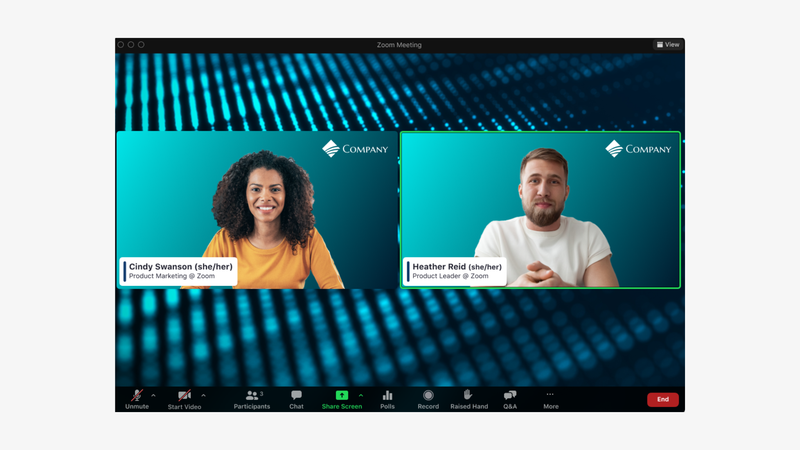
Price: from €75.83/month for 100 attendees, billed annually, for Webinars Plus. Pricing varies by capacity and plan.
Best for: SaaS companies running major launches, user conferences, or webinars with large audiences.
Why choose Zoom Webinars?
Zoom Webinars is worth considering when audience capacity and broadcast control are priorities: a major product launch, a user conference, or a presentation to a large audience.
Organizers manage the speakers and discussion, while attendees participate through chat, polls, and Q&A. For more advanced production, Webinars Plus adds a backstage area, a production studio, and simulive delivery of prerecorded content.
Zoom Events extends the offering to events with multiple sessions and networking spaces.
Key features:
- Registration, speaker, and audience management
- Chat, Q&A, polls, and reactions
- Recordings and attendance reports
- Backstage, a production studio, and simulive with Webinars Plus
- Multiple sessions, networking spaces, and event features with Zoom Events
What to consider: Zoom offers many features, which can make setup more complex. As a platform with roots in video conferencing, it requires time to configure roles, speaking permissions, and layouts to achieve the webinar format you want. If ease of use is a priority, test these steps before choosing.
5. ON24: for building a structured demand generation program
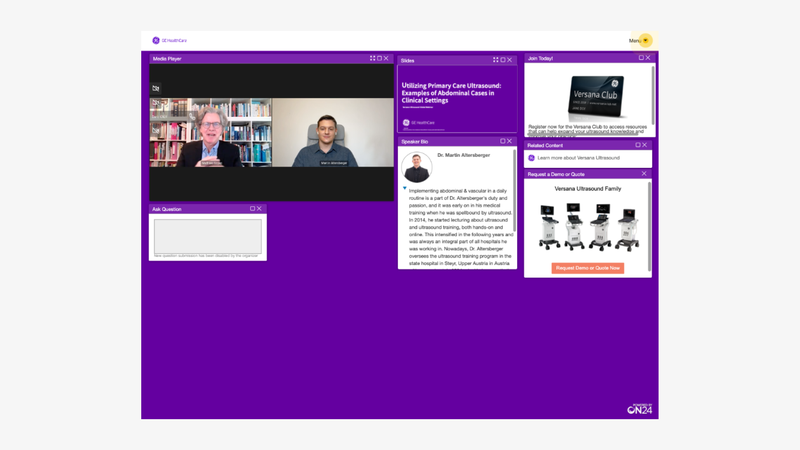
Price: custom pricing.
Best for: Marketing teams at established SaaS companies that run a regular webinar program and want to use the data in campaigns and sales follow-up.
Why choose ON24?
ON24 is designed for SaaS companies that want to integrate webinars into a structured demand generation program.
The platform combines live events, on-demand content, interactions, and engagement data to track audience interests across multiple sessions.
CRM and marketing automation integrations allow teams to use this information in campaigns and sales follow-up.
Depending on the modules selected, content libraries and AI-assisted repurposing also extend the useful life of webinars.
This approach suits organizations with a team available to manage the attendee journey and analyze results.
Its value therefore depends as much on your organization as on the number of webinars you run: who configures the journeys, uses the reports, and handles follow-up?
Key features:
- Live, simulive, and on-demand webinars
- Customizable experiences with polls, questions, and resources
- Engagement analytics and audience profiles
- CRM and marketing automation integrations
- Content libraries and AI-assisted repurposing, depending on the modules selected
What to consider: Ease of hosting deserves a thorough trial. The studio uses distinct roles, with tools that need to be prepared and assigned to speakers. This setup provides control but may require more preparation from a small team. Have the person who will actually run your sessions work through your planned format to assess the learning curve.
6. eWebinar: for automated demos and training

Price: from US$84/month, billed annually, for one active webinar and 1,000 registrants per month, with unlimited recurring sessions.
Best for: Sales and Customer Success teams that repeat the same presentations: product introductions, initial setup, or training on a recurring use case.
Why choose eWebinar?
eWebinar suits SaaS teams that regularly present the same content and want to make it available without requiring a presenter at every session.
A prerecorded video forms the basis of the webinar, with polls, resources, and calls to action built into the experience. Attendees can ask questions in the chat, and the team can answer during the session or continue the conversation afterward. This approach works well for an introductory presentation, the first steps of onboarding, or recurring training.
Scheduling and on-demand access offer attendees more flexibility, while analytics help improve the content.
However, videos still need updating, and someone needs to handle responses: automating delivery does not replace support or the adaptability of a live conversation.
Key features:
- Prerecorded videos delivered on a recurring schedule or on demand
- Polls, resources, and calls to action built into the experience
- Chat for answering during the session or continuing the conversation afterward
- Customizable pages, emails, and viewing rooms
- Viewing, engagement, and conversion analytics
- Marketing and CRM integrations
What to consider: The main content remains prerecorded. You cannot adapt the presentation in real time to the group's responses. You also need to update videos as the product evolves and organize how questions will be answered.
Which platform should you choose for your SaaS webinar format?
The right choice depends on your objective, your session format, and the work you need to do after the live event. Here are the criteria to prioritize for each use case.
Generating qualified leads
Prioritize individual attendee data and how you can use it in your CRM: who attended, which answers they gave, and which needs they expressed.
Sparkup and Demio are worth considering for their interactions and engagement analytics. Livestorm may be a good fit if its integrations and security practices meet your requirements. ON24 is worth exploring for a broader demand generation program that combines webinars, content, and campaigns.
Showcasing your product or announcing new features
Look for a tool that makes it easy to move between screen sharing, presentations, and audience discussions. Customization also matters when you want a consistent brand experience.
Sparkup suits interactive presentations where attendees can ask questions and speak. For a launch in front of a very large audience, consider Zoom as well.
Hosting a panel discussion or thought leadership webinar
Prioritize speaker management, smooth transitions, and audience participation. A good tool should make conversation easier and allow questions to surface throughout the discussion.
Sparkup is an option for combining branded production with a shared experience, particularly through its audience video mosaic. Zoom or Livestorm become relevant if your event includes multiple sessions.
Customer onboarding and training
The choice mainly depends on how much adaptation your sessions need. For a workshop where customers ask questions about their own usage, prioritize interactions and the ability to invite them to speak. Sparkup suits this participatory approach.
If you repeat a consistent presentation, eWebinar lets you automate it while retaining chat-based conversations. Demio also offers automated formats, depending on the plan. You can combine a prerecorded introduction with live sessions for specific questions.
International webinars
Check the languages available at each stage: registration, emails, captions, and replay. Consider time zones and mobile access too.
Sparkup is worth considering for its real-time translated captions. Livestorm also offers translation options to assess against the plan you need. Test these features with your industry terminology and product names: having a translation option does not, by itself, guarantee an experience suited to your audience.
FAQ
What is the best webinar platform for a SaaS company?
The choice depends on your use case. Sparkup suits interactive, branded webinars that are easy to run; Livestorm suits teams looking for a general-purpose platform with documented security practices; and Demio suits conversion-focused webinars. Zoom Webinars is worth considering for large audiences, ON24 for structured demand generation programs, and eWebinar for automated presentations.
Which data should you analyze after a SaaS webinar?
Beyond registrations, look at attendance, time spent in the session, poll responses, and questions asked. Aggregate data helps assess the session; individual data helps you understand each attendee's interests and personalize follow-up. An interaction indicates interest, but not necessarily purchase intent.
Can you connect a webinar platform to your CRM?
Yes, depending on the solution, through a native integration, an API, or a data export. Sparkup, for example, lets you build a connection through its API. Check which information is actually sent to your CRM and the setup work involved: an integration you can activate immediately and a custom integration do not require the same resources.
Should you choose a live or automated webinar?
Live works well for sessions that benefit from audience contributions: panel discussions, product launches, workshops, or training with questions. An automated webinar suits a consistent presentation you repeat regularly. You can also offer a prerecorded introduction followed by a live session to explore individual needs.
How should you compare webinar platform pricing?
Compare plans using the same scenario: number of sessions, expected attendees, hosts, and required features. Pay particular attention to the billing unit: concurrent capacity, registrants, or cumulative attendee credits. Include any add-ons, integrations, and setup costs to estimate the real budget for your program.
Do attendees need to install an app?
That depends on the platform, format, and settings. Several solutions let people join a webinar directly from a browser. Test the journey from the invitation email on both desktop and mobile to check the steps involved and which features are available without installation.
Can you use the same platform for prospects and customers?
Yes, if it supports your different formats. Prospects may need to understand your approach or evaluate your product; customers often want to complete a task or get more value from using it. Adapt your content, interactions, and follow-up, then distinguish these audiences in your analysis.